 Relistic
Connect your stores
Connect eBay, Etsy, Shopify and TikTok Shop to Relistic, and finish each store's settings so it can list.
Relistic connects to eBay, Etsy, Shopify and TikTok Shop through each store's official sign-in. You approve access on the store's own page, so Relistic never sees your password. You can disconnect at any time.
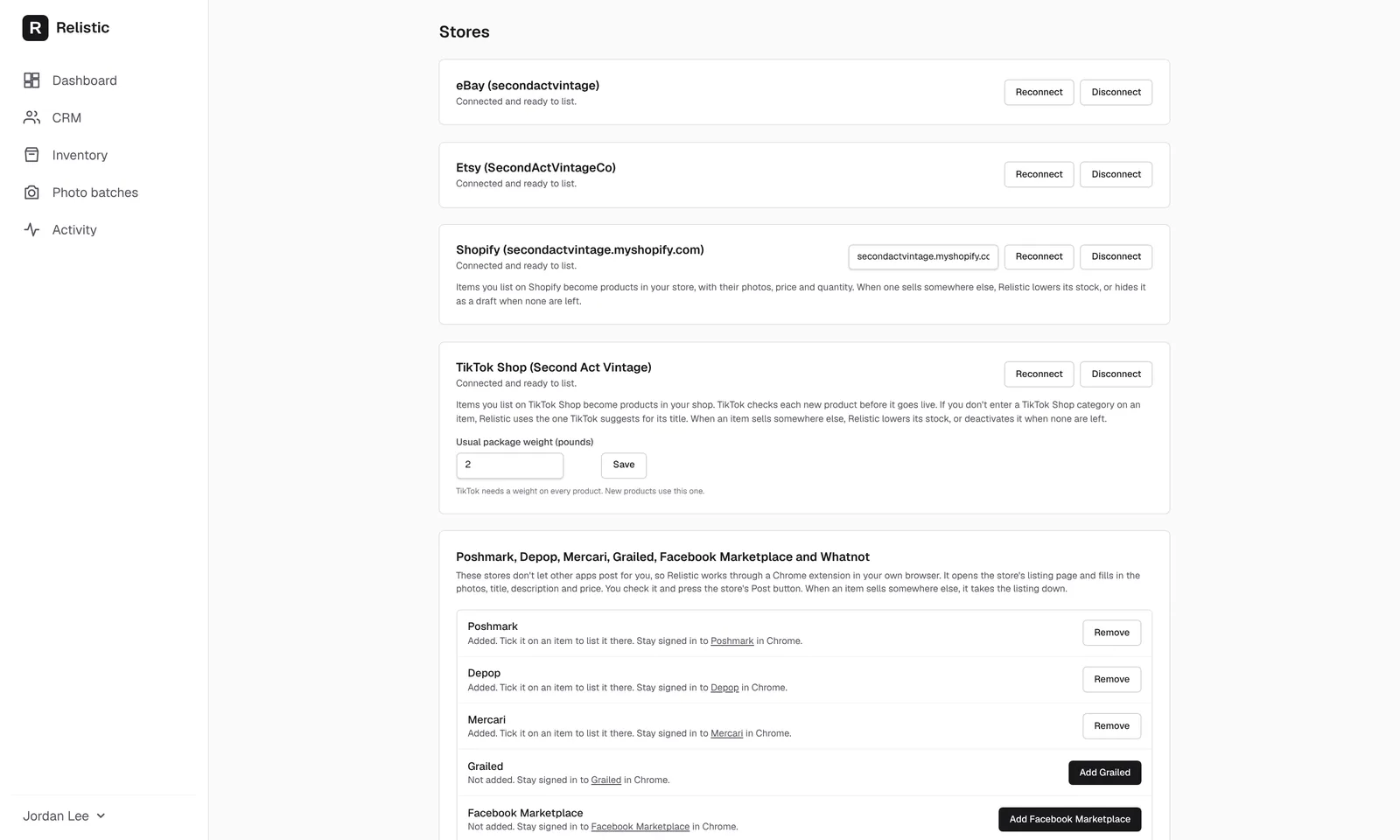
Open the Stores page
- Log in at app.getrelistic.com.
- Click your name at the bottom of the left menu.
- Click Stores.
Each store shows one of these:
- Connected and ready to list. You're done.
- Connected. Settings needed before listing. Fill in the settings under that store and click its Save button.
eBay
- On the Stores page, click Connect eBay.
- eBay's sign-in page opens. Sign in to your eBay seller account and click Agree.
- You come back to the Stores page. Under eBay, choose your Shipping policy, Payment policy and Return policy, and type your Ship-from ZIP code.
- Click Save eBay settings.
No policies yet? eBay calls your shipping, payment and return rules "business policies". If you don't have any, click Create my eBay policies under eBay and Relistic makes a simple set for you, which you can change later on eBay.
Etsy
- First, in your Etsy shop, make sure you have at least one shipping profile, a return policy and a processing profile (Etsy Shop Manager, Settings).
- On the Relistic Stores page, click Connect Etsy.
- Sign in to Etsy and click Allow access.
- Back on the Stores page, choose your Shipping profile, Return policy and Processing profile, and answer Who made your items?
- Click Save Etsy settings.
Etsy only allows resold items that are vintage (20 or more years old) or craft supplies. Relistic asks When was it made? on each item you list on Etsy.
Shopify
- On the Stores page, find Shopify and type your store's address, the one that ends in
.myshopify.com(for exampleyourshop.myshopify.com). You can find it in Shopify under Settings, Domains. - Click Connect Shopify.
- Shopify asks you to install Relistic. Click Install.
Each item you list becomes a product in your Shopify store. When it sells somewhere else, Relistic lowers its stock, or sets it to Draft when none are left.
TikTok Shop
- On the Stores page, click Connect TikTok Shop.
- Sign in to your TikTok Shop seller account and click Authorize.
- Back on the Stores page, type your Usual package weight (pounds) and click Save. TikTok needs a weight on every product.
TikTok checks each new product before it goes live, so new listings can take a little while to appear.
Reconnect or disconnect
- Reconnect signs in to the store again. Use it if Relistic says a store's access has expired.
- Disconnect removes the store and deletes the access Relistic held for it. Your items stay in Relistic.
The other stores
Poshmark, Depop, Mercari, Grailed, Facebook Marketplace and Whatnot don't let other apps post for you, so they work through the Relistic Chrome extension. See The Chrome extension.
Still stuck? Email angela.b@apeirosmarketing.com and we'll help.